




Create a Spring portlet with CRUD function in Easy Steps
What is Spring?
• Spring is an open source framework developed by Spring Source, a division of VMware.
• It provides lightweight solution to develop maintainable and reusable applications.
• Any JAVA application can benefit from Spring.
- Simplicity
- Testability
- Loose coupling
• Attributes of Spring
- Lightweight
- Inversion of control
- Aspect oriented
- Container
- Framework
• Spring is to keep the code as simple as possible.
• It develops application with loosely coupled simple Java beans.
• The current stable version of Spring is 3.0
• Spring framework can be summarized in two ways.
• It develops application with loosely coupled simple Java beans.
• The current stable version of Spring is 3.0
• Spring framework can be summarized in two ways.
Container:
- Spring can be described as a light-weight container, as it does not involve installation, configuration, start and stop activities.
- It’s just simple collection of few JAVA Archive files that need to be added to the project class path.
Framework:
- Spring can be described as an API containing a large collection of classes, methods, interfaces, annotations, XML tag that can be used in enterprise application.
- API helps you to use any framework or functionality very easily in your application.
Why Spring?
• Basic Spring philosophy
- Better leverage
- Avoid tight coupling among classes
- Enables POJO programming
- IOC simplifies JDBC
- DI helps testability
- No dependency cycles
- Not exclusive to JAVA (e.g. Microsoft .NET)
- Communicate to ORM , DAO, Web MVC
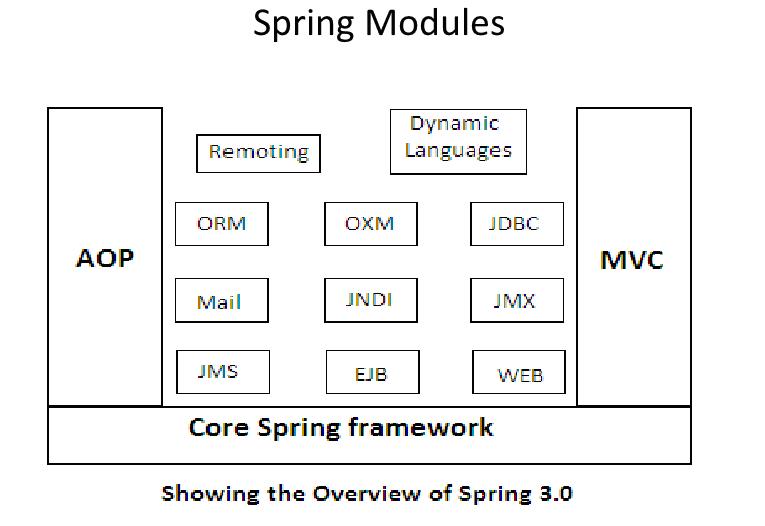
• Dependency Injection
o DI is the basic design principal on which core Spring framework is built.
o DI helps you to avoid unnecessary creation and lookup code in your application.
o Lets you define an XML file that specifies which beans are created and what their properties are
- Simplifies OOP by promoting loose coupling between classes.
- Also called “Inversion of Control” (IoC)
- IoC refers to the creating instances being done by the Spring container.
- The control for creating and constructing object is taken care by the Spring container.
- Primary goal is reduction of dependencies in code
• An excellent goal in any case
• This is the central part of Spring
• Aspect Oriented Programming
• This is the central part of Spring
• Aspect Oriented Programming
- “Aspect Oriented Programming” refers to the ability to add side effects to a class method calls without modifying the class source code.
- Lets you separate business logic from system services.
- Attempts to separate concerns, increase modularity, and decrease redundancy
- Separation of Concerns (SoC)
- Break up features to minimize overlap
- Don’t Repeat Yourself (DRY)
- Minimize code duplication
- Cross-Cutting Concerns
- Program aspects that affect many others (e.g. logging)
Step 1: Start Eclipse IDE, create a Spring Portlet known as Spring Sample Portlet.
Go to File -> New->Liferay Project and click on Next


Step 2: Select Liferay MVC from Portlet Framework and click on Finish.

Step 3: Go to New -> Liferay Service Builder

Step 4: Provide Package path, Namespace as well as Author Name and unchecked the box.
Click on finish.

Step 5: Add entity, finder and order by details in service.xml.

Step 6: Add necessary Spring related library in WEB-INF/lib

Step 7: Create a Spring context file with named as PORTLET_NAME-portlet.xml.

Step 8: Add beans entry in it.

Step 9: Add Spring Dispatcher Servlet Portlet class in place of default MVC Portlet class in portlet.xml.

Step 10: Add below entry in web.xml

Step 11: Execute ant build-service command through below navigation from Eclipse IDE.
Liferay Service Artifactory generate implementation, utility classes for entity mentioned in service.xml

Step 12: Now Create class under src/com/liferay called Film Profile Controller, and put below code in this class.
import javax.portlet.ActionResponse;
import javax.portlet.RenderResponse;
import org.springframework.stereotype.Controller;
import org.springframework.validation.BindingResult;
import org.springframework.web.bind.annotation.ModelAttribute;
import org.springframework.web.bind.annotation.RequestMapping;
import org.springframework.web.bind.annotation.RequestParam;
import org.springframework.web.bind.support.SessionStatus;
import org.springframework.web.portlet.bind.annotation.ActionMapping;
import org.springframework.web.portlet.bind.annotation.RenderMapping;
import com.liferay.test.model.Film;
import com.liferay.test.model.impl.FilmImpl;
import com.liferay.test.service.FilmLocalServiceUtil;
@Controller("filmController")
@RequestMapping(value = "VIEW")
public class FilmProfileController {
@RenderMapping
public String showFilms(RenderResponse response) {
System.out.println("inside show films......");
return "home";
}
@ModelAttribute
public Film newRequest(@RequestParam(required=false) Long filmId) {
try{
Film film = new FilmImpl();
if(filmId!=null){
film = FilmLocalServiceUtil.getFilm(filmId);
}
return film;
}catch(Exception e){return new FilmImpl();}
}
@RenderMapping(params = "myaction=addFilmForm")
public String showAddFilmForm(RenderResponse response) {
return "addFilmForm";
}
@RenderMapping(params="myaction=editFilmForm")
public String showEditBookForm() {
return "editFilmForm";
}
@ActionMapping(params = "myaction=deleteFilmForm")
public void deleteFilmForm(@ModelAttribute Film film,ActionResponse response) {
System.out.println("Inside delete film ...............");
try {
FilmLocalServiceUtil.deleteFilmProfile(film.getFilmId());
} catch (Exception e) {
// TODO Auto-generated catch block
e.printStackTrace();
}
}
@ActionMapping(params = "myaction=addFilm")
public void addFilm(@ModelAttribute Film film,
BindingResult bindingResult, ActionResponse response, SessionStatus sessionStatus) {
System.out.println("Inside add film ...............");
try {
FilmLocalServiceUtil.create(film);
} catch (Exception e) {
// TODO Auto-generated catch block
e.printStackTrace();
}
response.setRenderParameter("myaction", "books");
sessionStatus.setComplete();
}
}
Step 13: Create another class called Long Number Editor under src/com/liferay/test, and put below code in this class file.
import java.beans.PropertyEditorSupport;
public class LongNumberEditor extends PropertyEditorSupport
{
@Override
public String getAsText() {
String returnVal = "";
if(getValue() instanceof Long) {
returnVal = String.valueOf((Long)getValue());
}
if(getValue() != null && getValue() instanceof String[]) {
returnVal = ((String[]) getValue())[0];
}
return returnVal;
}
@Override
public void setAsText(String text) throws IllegalArgumentException {
setValue(Long.valueOf(text));
}
}
Step 14: Create another class called My Property Editor Registrar under src/com/liferay/test, and put below code in this class file.
import org.springframework.beans.PropertyEditorRegistrar;
import org.springframework.beans.PropertyEditorRegistry;
public class MyPropertyEditorRegistrar implements PropertyEditorRegistrar
{
public void registerCustomEditors(PropertyEditorRegistry registry) {
registry.registerCustomEditor(Long.class, new LongNumberEditor());
}
}
Step 15: Edit the FilmLocalServiceImpl.java file, and put below code in Impl file.
public Film create(long userId,long groupId,String director, String cast) throws SystemException {
long filmId = counterLocalService.increment();
Film film = filmPersistence.create(filmId);
film.setUserId(userId);
film.setGroupId(groupId);
film.setDirector(director);
film.setCast(cast);
filmPersistence.update(film, false);
return film;
}
public Film create(Film film) throws SystemException {
long filmId = counterLocalService.increment();
//Film film = filmPersistence.create(filmId);
film.setFilmId(filmId);
filmPersistence.update(film, false);
return film;
}
public List getFilmData(long userId)throws Exception
{
return filmPersistence.findByUserId(userId);
}
public List getCompanyFilm(long groupId)throws Exception
{
return filmPersistence.findByGroupId(groupId);
}
public int getCompanyFilmCount(long groupId)throws Exception
{
return filmPersistence.countByGroupId(groupId);
}
public void deleteFilmProfile(long filmId)throws Exception
{
filmLocalService.deleteFilm(filmId);
}
}
Step 16: Now build the service and deploy the portlet.